
is here! Shop now, pay later in 4 easy installments
DeliveryNZ-wide
CAIZHU 4010 Blower Fan 12V Dual Ball Bearing 40x40x10mm to Pinterest (opens in a new window)

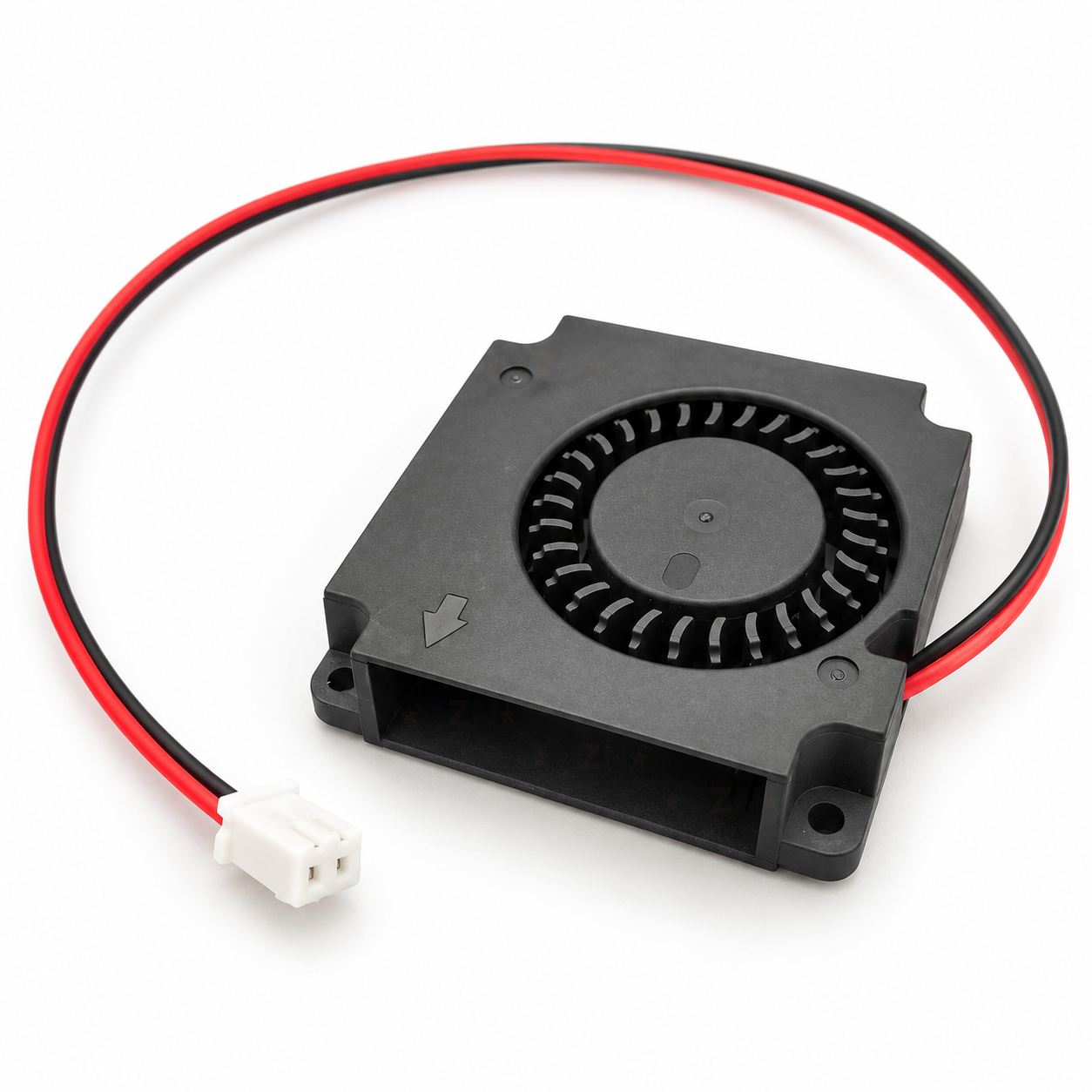
CAIZHU 4010 Blower Fan 12V Dual Ball Bearing 40x40x10mm

$15.99 incl. gst

SKU: CLICK-IT-653204 Category:

Verified specifications

Brand
CAIZHU

Taken from this product's published details. If something is not listed here, it has not been verified.

Ask AI about this product

Answers use this product's information and the store's details. If it cannot be confirmed, it will point you to our team.

Any language. Press Enter to ask

Frequently bought together

Bundle idea: this item plus 2 recommended accessory/accessories, $42.68 in total. Add each item to the cart below.

Description

A CAIZHU 4010 radial blower fan for 12V systems: 40 x 40 mm square, 10 mm thick, with a brushless motor on dual ball bearings. It draws air in through the round intake and pushes a narrow, strong stream out of the side outlet, which is what a 3D printer part cooling duct needs. It comes with a red and black lead of about 30 cm and a white 2-pin 2.54mm plug.

Specifications

Fan typeRadial blower, side outlet
Size40 x 40 x 10 mm
Rated voltage12V DC
MotorBrushless DC
BearingsDual ball bearing
Wires2: red +12V, black 0V
PlugWhite 2-pin, 2.54mm pitch (XH style)
Lead lengthAbout 30 cm
Speed signalNone (2-wire fan)
Mounting holes4, about 2.4 mm, about 35 mm apart
Outlet openingAbout 28 x 8.5 mm
ScrewsM2, or M2.5 self-tapping

Datasheets

What’s in the box

1×
4010 blower fan, 12V

With its lead and white 2-pin plug fitted. Mounting screws are not included.

Great for

Cooling printed layers through a part cooling duct on a 12V 3D printer
Replacing a worn or noisy 12V 4010 blower
Blowing air across a heatsink or driver board in a small 12V enclosure
Pushing air through a narrow printed duct in a 12V project

Wiring & getting started

  1. Check the fan voltage

    Make sure the fan port or supply is 12V. Many current printers, such as the Ender 3 series and Voron builds, run their fans at 24V. On a 24V port this fan needs a step-down converter set to 12V.

  2. Fit it to the duct

    Push the rectangular outlet into the duct and fix the fan through the corner holes. The moulded arrow on the intake face points to the outlet, and the label side is the back.

  3. Plug in and test

    Red goes to + and black to 0V. Check which pin of your board’s port is + before plugging in. Set the part cooling fan speed in your slicer or with M106; very low percentages may not start the fan.

Additional information

Brand

CAIZHU

Reviews

There are no reviews yet.

Only logged in customers who have purchased this product may leave a review.

We’d love to hear what you think!