
is here! Shop now, pay later in 4 easy installments
DeliveryNZ-wide
DS18B20-Compatible Digital Temperature Sensor – TO-92, 1-Wire to Pinterest (opens in a new window)

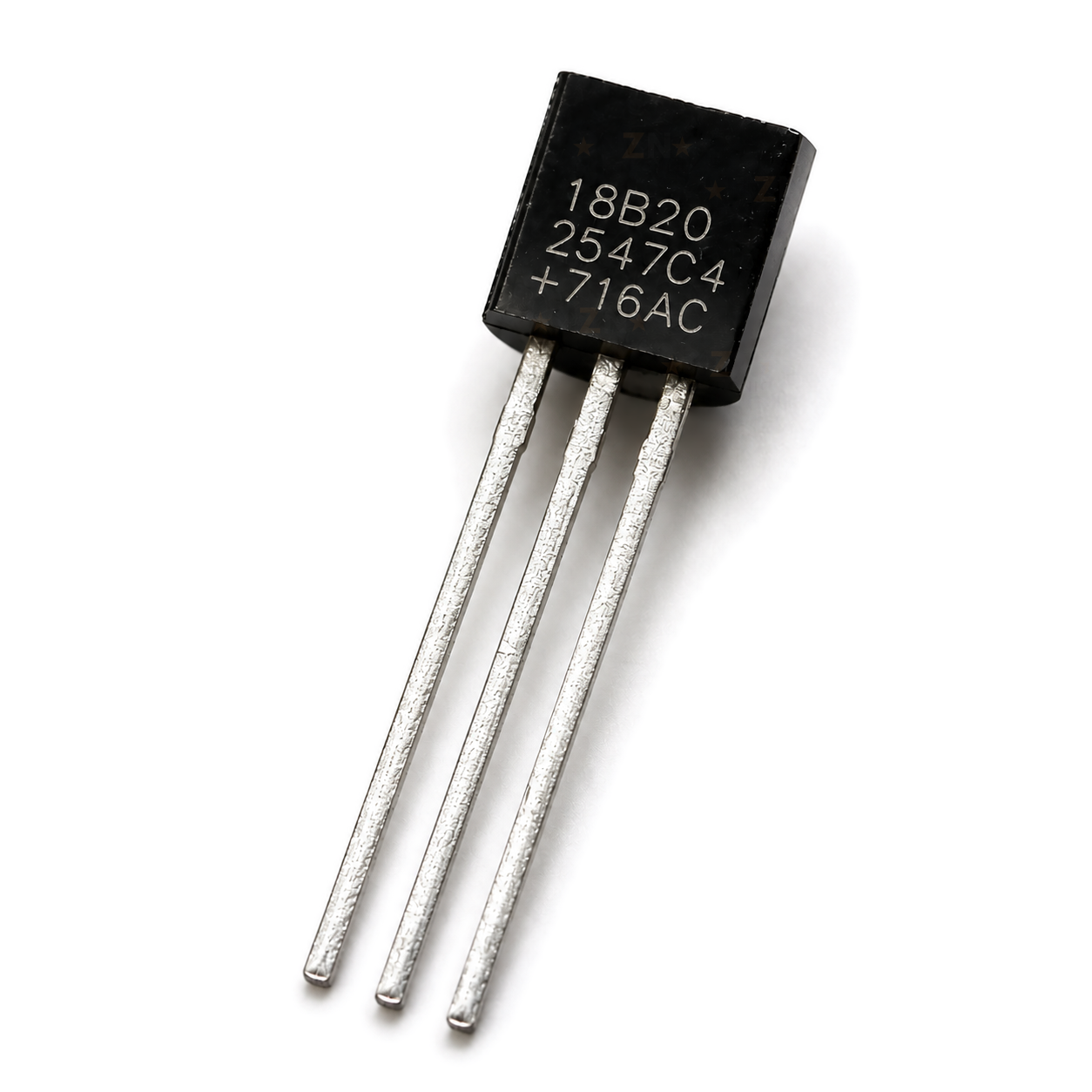
DS18B20-Compatible Digital Temperature Sensor – TO-92, 1-Wire

$2.30 incl. gst

SKU: CLICK-IT-343924 Category:

Verified specifications

Brand
NZN Electronics

Taken from this product's published details. If something is not listed here, it has not been verified.

Ask AI about this product

Answers use this product's information and the store's details. If it cannot be confirmed, it will point you to our team.

Any language. Press Enter to ask

Frequently bought together

Bundle idea: this item plus 2 recommended accessory/accessories, $8.29 in total. Add each item to the cart below.

Description

A bare DS18B20-compatible digital temperature sensor in a three-lead TO-92 package. It sends readings over a single 1-Wire data line, so one pin on an Arduino, ESP32 or Raspberry Pi can read several sensors. Use it on a breadboard or PCB, or seal it into your own probe. It needs a 4.7k pull-up resistor on the data line.

Specifications

SensorDS18B20-compatible, 1-Wire
PackageTO-92, 3 straight leads
PinoutGND, DQ, VDD (flat face towards you, leads down)
Supply3.0 to 5.5V, works on 3.3V and 5V boards
Resolution9 to 12 bit, 0.0625°C steps at 12 bit
Conversion timeUp to 750 ms at 12 bit
Data lineNeeds a 4.7k pull-up to the supply (not included)
Measuring range-55 to +125°C (DS18B20 family rating)
SizeBody about 4.7 x 5 mm, leads about 15 mm at 1.27 mm pitch

Datasheets

What’s in the box

1×
DS18B20-compatible TO-92 temperature sensor

Bare sensor in an anti-static bag. The pull-up resistor and wiring are not included.

Great for

Logging room or enclosure temperature with an ESP32
Reading several temperature points from one Arduino pin
Building your own sealed temperature probe
Switching a fan or heater from a thermostat sketch
Watching heatsink or battery pack temperature
Raspberry Pi temperature readings over 1-Wire

Wiring & getting started

  1. Find the pins

    Hold the sensor with the flat face towards you and the leads pointing down. From left to right the pins are GND, DQ (data) and VDD.

  2. Power it from your board’s logic voltage

    Connect VDD to 5V on an Arduino Uno or Nano, or to 3.3V on an ESP32 or Raspberry Pi. Connect GND to GND. Swapping VDD and GND makes the sensor hot quickly, so check before powering up.

  3. Add the 4.7k pull-up

    Fit a 4.7k resistor between DQ and VDD, then connect DQ to a digital pin, such as D2 on an Arduino or GPIO4 on an ESP32 or Pi. Our DS18B20 adapter module has the pull-up fitted and a screw terminal for the leads.

  4. Read it

    Install the OneWire and DallasTemperature libraries in the Arduino IDE and open the Simple example. Allow the full conversion time, up to 750 ms at 12 bit, before each reading.

Note: This is a DS18B20-compatible sensor. It uses the same pinout, commands and libraries, but compatible parts can differ in accuracy and conversion timing. Use normal three-wire power rather than parasite power, and check it against a known thermometer if accuracy matters. For wet or outdoor use, see our DS18B20-compatible waterproof temperature probe.

Additional information

Brand

NZN Electronics

Reviews

There are no reviews yet.

Only logged in customers who have purchased this product may leave a review.

We’d love to hear what you think!